
Approving deployments with GitHub Actions
Exploring some new technologies and techniques being used at my new job


I started a new job at Modal last week, the first time I’ve started at a new company in more than a decade. Between onboarding, initial projects and trying to keep up with all the discussions happening in Slack, there’s been a lot to get up to speed on. So over the weekend I took some time to play around with a couple of the technologies I’ve seen in practice. Specifically GitHub Actions deployments and Pulumi.
(As a tl;dr, the project is in a public repo: github.com/theothertomelliott/pipeline-examples)
I’ve used GitHub Actions for a bunch of personal projects, but never really used it for anything large, so while I was familiar with the platforms, I’d never used deployments or environments in anger. As for Pulumi, I’d never used it at all and quickly discovered a few misconceptions I didn’t even know I was holding onto.
GitHub Actions deployments are a set of features that give greater control over the flow of a pipeline in relation to a set of environments.
There’s a delightful little mental pitfall here in terminology. Environments can have variables, which are sometimes referred to as “environment variables”. But this is not the same as “environment variables”. You know, the ones you use in shell scripts. Of course, you can use environment variables and environment variables in your Actions workflows. You can even put environment variables into environment variables to use in shell scripts. With me so far?
What are environments good for?
We use deployments primarily for control flow. Deployments are associated with a specific environment, and have protection rules enabled to require human approval before a deployment can proceed.
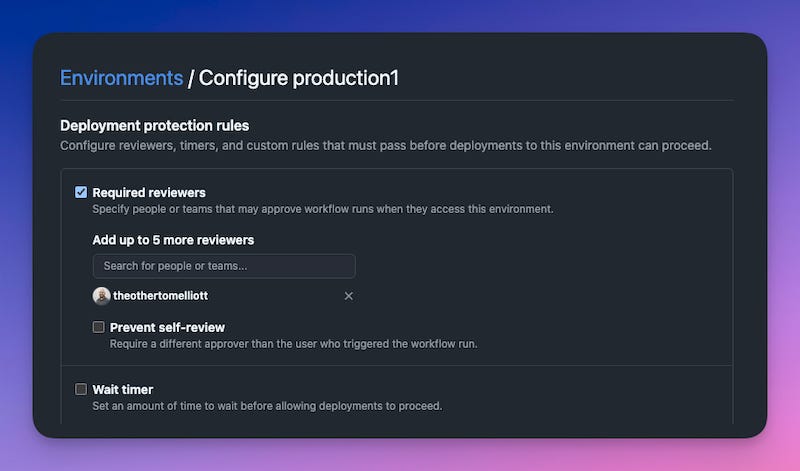
Jobs in a workflow can then be configured to be tied to an environment:
  production1:
    name: Deploy to Production1
    runs-on: ubuntu-latest
    needs: staging
    environment: production1
Whenever this job is ready to run, it will be left in a pending state until manually approved by a review who is either listed explicitly (as above) or is a member of a listed team.
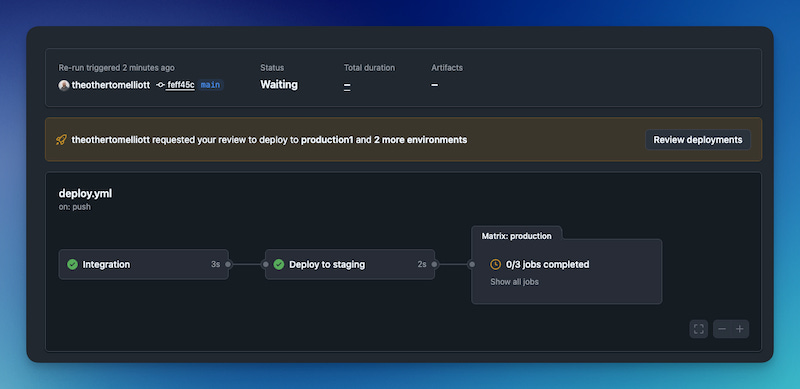
This way a member of the team can perform spot checks (like reviewing a Pulumi plan) before allowing a deployment to proceed.
It’s not perfect
This is straightforward enough, but it has its issues. For one, if you have multiple environments requiring approval at once, you need to select each one individually.
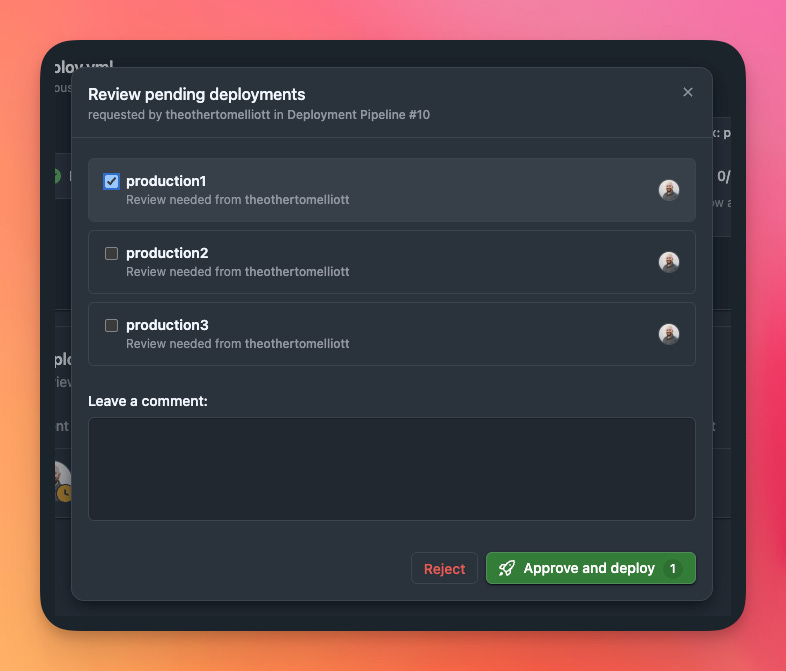
Its annoying enough to need to click every single environment (imagine if you had a hundred!), but it also adds extra cognitive load. Did I check every environment? Was the warning I saw in prod2 or prod3?
The annoyances don’t end there. By default you also get an email for every environment that needs approval. Part of a team of reviewers? Everyone gets an email for every approval request. Again, multiply that by however many production environments you might have.
Setting up environments can also be tedious. Putting together an example with a few environments took a decent amount of clickops, and it’s all to easy to forget to enable approval in a new environment. It makes sense to have the protection rules separate from the code in the repo (otherwise anyone could disable the rules my pushing a change), but in this case it can come at the expense of consistent configuration.
My implementation
Focusing on these issues, I built out an example pipeline that used Pulumi to configure the set of environments and protection rules, and created a GitHub App to manage the approvals themselves through a custom protection rule.
The main attraction for Pulumi is that it uses SDKs in familiar languages, so I could create helper functions to set up my environments and call them in a loop:
# Create staging environment (no protection rule)
staging_env, _ = create_environment(
    name="staging",
)

# Create production environments with protection rule
production_envs = []
for i in range(1, 4):
    env, protection = create_environment(
        name=f"production{i}",
        protection_rule_id=2918233,  # Pipeline approvals app
    )
    production_envs.append((env, protection))
The create_environment function could then call github.RepositoryEnvironment to set up the environment. Unfortunately, the provider doesn’t currently support custom protection rules, so I had to create a resource provider that used the GitHub API directly to configure this part.
You might have noticed the numeric id for the protection rule. This is an ID for a GitHub App, which I created to process approval requests. Whenever approval is required for a deployment, the app’s callback webhook is sent a POST request with details of the request. It can then send an approval via the GitHub API, after a little back and forth to get an auth token.
Setting up this app had some potential to be a pain, as it needed to be accessible on the public internet. It quickly dawned on me that I could use Modal for this by serving a web endpoint. It seemed like a good way to test out the tools I’d be helping to build, but also made it pretty easy to iterate, since while running with modal serve, my local changes were automatically served from the public endpoint.
Of course, the irony is that I couldn’t really do it this way at work, since we’d be relying on our production environment to deploy to production…
Now I had a way to set up the environments and a custom protection rule flow, I needed to make sure the workflow could handle all these environments. I didn’t want to have to change code to list every single workflow, so I set up a matrix for the job:
  production:
    name: Deploy to ${{ matrix.environment }}
    runs-on: ubuntu-latest
    needs: staging
    strategy:
      matrix:
        environment: ${{ fromJson(vars.PRODUCTION_ENVIRONMENTS) }}
    environment: ${{ matrix.environment }}
This consumed a repository variable, PRODUCTION_ENVIRONMENTS which listed all the environments as JSON. I used Pulumi to create this variable, so it would stay in sync with the actual set of environments.
# Create a GitHub repository variable for production environments
production_env_list = [env.environment.apply(lambda e: str(e)) for env, _ in production_envs]
production_envs_json = pulumi.Output.all(*production_env_list).apply(
    lambda envs: json.dumps(envs)
)

github.ActionsVariable(
    "production-environments",
    repository="pipeline-examples",
    variable_name="PRODUCTION_ENVIRONMENTS",
    value=production_envs_json
)
Want to see the whole thing? The repo is at github.com/theothertomelliott/pipeline-examples. From there you can see both the code, and examples of recent pipeline runs.